

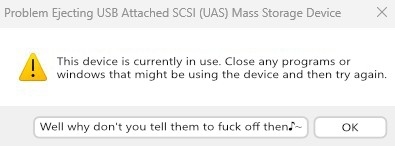
I don’t fucking know why I can’t eject USB hard drives. I installed the SysInternals apps, and best they can tell me is that Dropbox is fucking with the drives. I explicitly told Dropbox to not fuck with USB drives. I don’t know who’s lying, I just want whoever is fucking with the drives to stop fucking with the drives, OK??? OK.
Not 99%. Windows has many usability issues. I’d vote for “dont steal focus and stick windows in front of where I’m typing” and “don’t move things just as I go to click on them” for a start, and also “don’t somehow take an hour to delete 50 files.”
“Fun” fact: if you think it’s slow normally (and to be fair, it is), NTFS seems to have a pathological performance regression when a directory contains more than 10,000 children, any operations on files in that directory slow down by around 95%.
I discovered this on our CCTV system at work (that runs on Windows Server 2022), which creates an inordinate number of small files (each containing at most a few seconds of video). It was causing some of its periodic maintenance tasks to fail, as they’d take longer to run than than the configured interval between them.
Windows also really doesn’t like dealing with half-petabyte filesystems, just like… at all.
NewTechnology File System(of 1995)
It’s new compared to FAT!
I can also tell you that if you are working with file numbers in the 10,000, windows will notoriously interfere with their built-in services. When copying or moving, msdefender might delay every file copy because it marks the action as suspicious and begins scanning the files beforehand. And also the trkwrks or however that drive observation service is called may block actions on specific files just because.
In short, you are not only fighting drive formats at that point, you are also fighting your built-in system services. Source: I wanna die.
Have you tried turning off thumbnails? In my experience when it slows down on large directories like that it’s either trying to generate thumbnails or index a bunch of new files (which is also a possibility in your use case)
A great thought on the thumbnails, but the behavior exhibits even when using command-line tools.
Indexing is off for the entire drive, I can’t even begin to imagine what kind of mess that would make if it was on.
At this point I wouldn’t even be surprised if windows still starts generating thumbnails in the background when using the command line
Deleting files was an amazing one already. Then I recently discovered the joy of deleting 30k emails from Outlook… T-T
I literally cannot understand how Outlook is so awful and unpleasant to use. Constant pauses, regular freezes and a search that will show a document I sent to myself five years ago regardless of search terms but won’t surface the perfect match I received yesterday, in the world’s most prominent email client.
The only worse software I have to interact with on a daily basis is Adobe’s PDF reader, which gives me five popups within one minute of opening it and takes over a minute to do a text search in a five page document.
I typically use my browser for PDFs. Firefox actually has some basic PDF edit functionality now.
I copied 400GB of assorted files in an RDP session today and Windows had to think for a minute or two, then copy them ever so slowly, then stop at 99% done, then crash Explorer and disable the start menu and taskbar and CTRL-ALT-DEL and all ways of getting to the Task Manager, and then freeze the whole machine so that I had to travel to the physical machine and hold down the power button, since when it has been unusably slow because Windows now wants to rebuild the RAID array, which takes days. This was a pretty average Windows session.
Try Robocopy. It’s built-in and allows using multiple threads.
That thinking is so very annoying. This is all time that could be used to copy files.
The best bit is that if you lose patience and cancel, the “Cancelling…” takes even longer than finishing the job would have done. I really have no idea what’s going on. Journalling file systems in Linux don’t have to do this.
lol still? Since at least like Win 7 or XP