transcription: be me, closeted transfem, have computer science degree, family constantly bothering me with tech problems, always dumb shit like not restarting computer or googling error messages, lightbulb.jpeg, come out to family, get disowned as expected, they never contact me again, dont have to deal with their dumb it problems anymore, mfw, should have done this years ago.
closeted transfem
computer science degree
Why saying the same thing twice?
Some of them are not closeted?
Fair lol
To any trans girls who decided to peek into the comments:
What’s actually the difference between X11 and Wayland? I always hear the latter is the more modern standard and that I should be switching to it, but also it feels like X11 is just way more stable and well supported, why can’t I stay on there just a while longer?
Not a trans girl but Wayland and x11 are display server protocols. A display server is the program that draws windows and stuff on the screen (plus, does some other things related to desktop environments), and these protocols are how the applications control their windows.
X11 is very old and based on obsolete ideas. It is a less efficient protocol than Wayland, and has many security issues. The most prominent one is that any unprivileged program can read the entire screen and record any input. X11 development has for a long time revolved around a single display server that everyone used, called x.org, this is partly why it developed so fast. However the codebase is a mess because it started so long ago and developed so fast, so it’s almost untouchable. That’s why modern features like hdr and real multi display support will never arrive.
Wayland is the modern protocol that will replace x11. It is built from the ground up to avoid the mistakes made by x11. Because of this, development is often stuck discussing esoteric scenarios, to make sure everything is perfect before adding it to the protocol. Unlike x11 there is not a single Wayland server, and this is why you will see differences between implementations. Unlike x11, Wayland is designed around modern computers.
Unless you are using something that specifically only works on x11, you should use Wayland.
Not a trans girl but Wayland and x11 are display server protocols.
Found the egg!
Fun fact: a suspiciously sizeable amount of the people working on mesa, freedesktop, and the linux graphics stack in general, are trans or at least queer.
Is it graphics that makes people trans, or are the trans people who make graphics? We might never know
Mystery! And how do the furries fit in?
They are in the airports
And the CIA, NSA, FBI, DHS and any security focused gov op
I mean depending on who you ask I’m sure they’d consider furries to be at least one definition of queer.
That’s just great, as a transfem I now feel I have to drop my current plans, to stop and contemplate if I enjoy making 3d game art because I’m trans, or if 3D game art somehow made me trans. It’s not the programming side, but is still the visuals and graphics…
I am 99% sure, if it had to be one of those options, it would be the former. I doubt it’s either of the two… And yet, how will we know.
So now I am cursed to I sit and ponder the possibilities
Wait a minute… How do i know if im an egg again…?
Hii! trans girl here who messed with libwayland and x11 a bit before. Wayland has the compositor and server combined so there’s less overhead.
Here’s the X11 architecture.
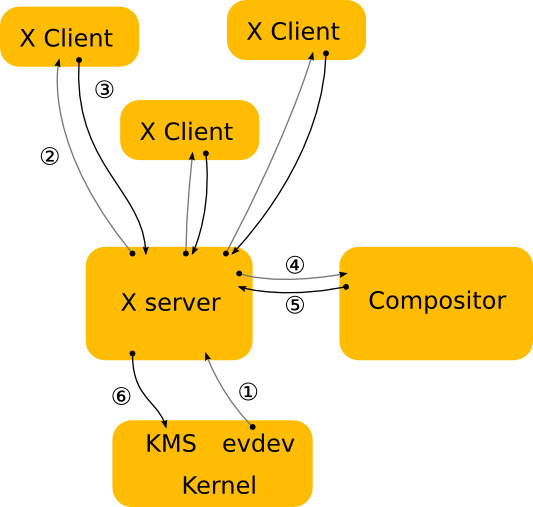
Let’s say you pressed the fullscreen button with your mouse:
- First the evdev driver will get your mouse input and send to X server.
- X server tells the X client that someone just clicked so-and-so coordinates. X server HAS to assume which client because windows may be on top of each other, and only compositor (our renderer) calculates those. Often server assumes wrong tho so has to try everyone one by one.
- The X client re-arranges everything after fullscreen, sends X server what changed.
- X server calculates which area the change was in, sends to compositor asking they render that area again.
- Compositor calculates that all windows fall behind the fullscreen window, renders the one on top, sends X server what changed.
- X server does the graphics displaying part from there.
Now here’s Wayland architecture
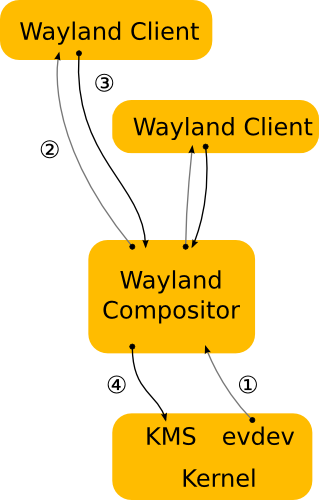
- You press fullscreen with mouse, evdev sends it to Wayland compositor
- Compositor knows what windows are where, knows which client was clicked. Sends it to them.
- Client realizes they are being fullscreened, they reareange AND render their own changes themselves too. Client also directly writes to a shared buffer they have with the compositor to not waste time sending their render results.
- Compositor already has the changes in shared buffers, recomposes the screen based on all the clients’ new rendering.
So now some redundant steps are gone, and also the shared buffer is nice too. Overall, wayland uses less resources for more work.
Technical writing if you’d rather read that. Also source of the images too. Hope this helps! (Sorry for my poor English if I made any mistakes)
https://wayland.freedesktop.org/architecture.htmlNote: In defense of x11, I heard someone on lemmy mention it has more accessibility features supported currently.
Damn, I was already on the Wayland train, because slightly smoother, but I didn’t know X11 was so wonky…
also the x11/xorg (don’t know which) codebase is a big mess, and the people working on it wanted to start from scratch
I heard someone on lemmy mention it has more accessibility features supported currently.
For now. But both GNOME and KDE are working on it
X11 is a decades old protocol. People kept saying “can you please support this one new hot thing?” and the devs were like “fuck, let me think of something. [furious duct taping] There, it works! Kinda.”
Yes, it’s “stable”, by some definition of stable anyway. Also with loads of technical debt. You can keep extending it, but it’s a painful, janky process every single time.
Wayland is a clean break from all of that with a more modern approach. But, of course, it’s newer, and with a clean break you want software to be ported over to best utilise Wayland, and there’s going to be a lot of work until you can finally drop the X11 compatibility layer.
But I don’t think there’s anything wrong with the idea of X11 backwards compatibility at the moment. Or staying with X11 until Wayland runs on your hardware. But when the app toolkits eventually support both, I think targeting new software exclusively for X11, or further development of X11 itself, is starting to look less and less sensible as time goes on.
One of my personal gripes is no protocol-level equivalent to headless, multi-monitor VNC. With X11 it just worked regardless of DE, on Wayland this functionality seems to have been thrown downstream to DE’s to implement, making the current landscape a nightmare.
Calling x11 well supported at this point is like calling a 1977 Pontiac firebird trans Am. Well supported
It’s liked, there’s lots of information about it. But any real support died for fucking ever again. And the only people claiming otherwise have their heads buried deep in the sand.
Even calling it stable has a lot of ifs to it at this point. If your on a old system, only doing basic things, with a well trodden and documented track record. Then yeah it’s more solid then a block of solid rock.
But half the reason it’s “stable” is because it’s a duct taped mess that is basically a bat shit insane house of cards one bad day from falling apart.
But we know every fault, trick, and piece of duct tape. So the chance of it falling apart is almost zero.
Waylands problem tends to be it just refuses to hurry the fuck up and actually get any real work done. But what does get done tends to get done more right then x11 and quickly fixed up as issues come up.
So long as the gnome team shuts the fuck up and doesn’t interject. If they do then all bets are off.
Not trans but…
X11 lets anyone do anything. That’s bad. A window can type for you and see what you’re typing. Windows level opsec
Wayland only lets root do weird stuff. That’s good. You need privileges to see what a given person is typing or to move their mouse
However, Wayland is still undercooked. It doesn’t have standardized remote desktop functionality, for example. So it’s really more of a “what are you willing to sacrifice” thing. Do you want security or features?
There’s also internal differences but to the end user those don’t really matter
I have bunch of configs and scripts that over the years have bonded me permanently to X11. Unfortunate reality.
The biggest benefits Wayland has currently (at least obvious ones to end users) is multi monitor fractional scaling and HDR

Ironic meme…
This is what they call a pro gamer move.
Being yourself is the perfect filter for people who doesnt fit :D
I hope you also sent them this meme as a last message.