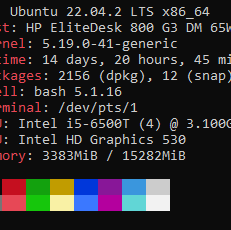
Are we not doing kernel upgrades?
Yeah that’s about the only time I have to do reboots at work which are 99% linux. Well the production ones anyway.
Or the other reason is my lab having power issues due to malfunctioning UPSes, faulty NEMA L6-30 plugs, janky 240v circuit breakers or… I’m beginning to think my lab is electrically cursed.
While technically the truth, it can be a hassle to make sure you restart all relevant services after updating a given library.
I just like being able to restart underlying system to take care of any possible straggler without thinking, and the services broadly be provided by multiple systems so the “experience” is starting up through a rolling reboot
Was about to say, “or if you’re running Arch, the last time you updated the kernel or systemd version, so probably last week or summit.”
Pretty sure everybody is missing the joke. The joke is that Debian packages are so stable and stale that you likely will need a reboot before an update.
Also, it’s a joke…please patch your boxes, k?
I’ve got a patch in my boxers right now.
Oh boxes.
I got obsessed with uptime in the early 2000s, but for my desktop Slackware box. It ran a bunch of servers and services and crap but only for me, not heavy loads of public users. Anyway, I reached 6 years of uptime without a UPS and was aiming for 7 when a power outage got me.
Skill issue. Next time you can open up the computers power supply while it’s running, splice in a second power cable, and attach a UPS without powering down or getting electrocuted.
For legal reasons, /s
Not sure what your signature is supposed to do here but now I have 3rd degree burns and a fireball has engulfed my office wall
But more importantly, did your uptime get reset?
how long since the boss has been asleep so you can finally restart without them calling two seconds later cause they didn’t bother reading the scheduled downtime email
This is why we have UPS ;-)
Seriously, one black out and suddenly you see the need for a UPS. Now my desktop is on a USB, my work laptop and monitors are on a UPS, my homelab is on a UPS, even my modem and router are on a UPS. I just wish I could get a backup generator, but that’s not happening anytime soon.
My experience with using an UPS is that they have caised an outage every few years, which is more often than we get power outages where I live, so I didn’t replace the batteries last time the UPS took down my server, and are just running straight from the wall. It might be better with a more expensive UPS, but it’s not worth it for me.
Yeah I read up on them before I bought, APC seemed like the best. I test them at least once a year and so far I’ve only had to replace one battery. Depending on the application I paid between $80 and $180 for each, but the higher upfront cost seems to have paid off for me at least. I am a sample size of 1, your results may vary.
A hale storm earlier this year and the power outage it caused created some bizarre issue with my home server I have yet to diagnose. All of my containers and VMs corrupted in some way, so I had to restore from backup, but my file server container has some sort of permissions issue on top of that.
Honestly the brownout before the outage is almost definitely what did it, but the cost of a UPS that also protects against brownouts is well outside of my usual hobby budget so it’s hard to justify on ewaste hardware that I got a pallet of for less than what the UPS would cost used
I got tired of my network puking every time the power went out for 5 seconds.
Edit- My NAS really dislikes having the power cut off.
Yep, the black outs have stopped now but for a while it was a daily occurrence. My NAS took a beating and so did my desktop. I spent a ton on ups’s to make sure that stuff was protected and bonus, I wouldn’t loose connection while on phone calls with government officials while at work… they get pissy when you suddenly drop off.
I sometimes have power outage in winter (snow storm, ice, etc) and working from home I need a UPS ; modem cable, router, PC, monitors, are on it, it can stand ~5h
I’ve had good luck with APC. Just be ready to pay a bit more upfront. But so far in the last 6 or 7 years, I’ve only had to replace one battery.
I bought a used APC Back-UPS Pro BR1500G for $100 on market place, it was a good deal, I replaced the 2 battery inside and added 4 outside (it is supported), I’m ready!
$100 is a good deal, though with the batteries you probably paid as much as a new one. But you have extra battery life so win.
“Uptime” — aka the anxiety meter for every sysadmin.
My father was an HPUX admin that had a server with an uptime of >12 years
I was introduced to homelab by trying to figure out how my uncles setup. It ran for 4 years after he died, 11 years uptime. The estate probate prevented anyone from touching the equipment for the legal fights, and I get a kick out of thinking of how smug he would have been about it.
Heard of tuptime? I’ve been using it for a while now, I think I like it.
System startups: 151 since 18:00:05 10/11/15 System shutdowns: 137 ok + 13 bad System life: 9yr 223d 1h 27m 47s
Longest uptime: 106d 5h 34m 28s from 14:17:10 26/03/22 Average uptime: 23d 4h 32m 0s System uptime: 99.81% = 9yr 216d 12h 31m 51s
Longest downtime: 4d 23h 30m 48s from 10:36:53 14/09/23 Average downtime: 1h 2m 46s System downtime: 0.19% = 6d 12h 55m 56s
Current uptime: 25d 0h 34m 25s since 20:25:37 15/11/25
Heard of it for the first time (as far as I can remember) a couple days ago, on Lemmy.
TIL, Lemmy’s educational.
Does it work retrospectively?
Nope it creates a little database, which you could manualy edit I suppose.
So, you never update the kernel?
@NullPointerException @yesman debian never updates it
At least in my experience the chances that I move or replace hardware are much higher than the chances for a power outage.
For me I won’t be replacing and video cards or ram sticks for the foreseeable future.
Same… but I also remember a single outage in the last 15 or so years.
manNot much, time. What’s up with you?
total erection time
Priapism isn’t a good thing.
Never heard women complain about it.
At some point when I am less busy again I think I am gonna swap back to a debian based system because my experience on arch and red hat systems just hasnt been as good (this may be because I started on Debian based systems and keep trying to use commands that dont work on the other ones out of muscle memory)
I get bored every so often and move all the important stuff to an external drive or a separate internal one and completely change my os
I am on manjaro but I have also run arch, red hat, void, mint, Debian, Ubuntu and a bunch of others that I either put on laptops or something similar as messing around with devices
Tails and slitaz have to be my favorite to run from a USB but peppermint isn’t the worst
I just did the contrary. Moved from debian to arch. After the update to trixie my network stack completely died somehow, so I’m going back to arch.
I have had minimal issues from my manjaro desktop but I just dont like it as much as my mint based systems because everything feels wrong and I can barely remember how to update my graphics drivers on manjaro vs mint where I am confident I could run my entire system mostly command line from installs to updates and random other shit that I just can’t remember how to do through arch systems because I dont run them as hard for some reason
That’s ridiculous. It’s much more complicated than that.
You need to check NUT.
Deez? 🌰🐿️
Can I ask, what is the advantage of a Debian server over a True Nas one? Asking because I set up True Nas and wondering if I should switch it to Debian
True nas is nas software that moonlights as a server. Debian is a linux distro commonly used as the operating system for servers due to its incredible stability and reliability among other things. So reliable infact that it’s used as the operating system for true nas scale! So unless your using the core version (that runs bsd) then your already using it. As far as rawdogging Debian on your hardware goes, id recommend against it unless you’re looking to seriously up your admin game. No web interfaces, lots of time in the terminal ( command line ) and more configuration files than is anyway reasonable. And we haven’t even started on virtual machines like proxmox ( also Debian based! ) or container critters like docker and kubernetes. (Iirc true nas uses kubernetes under the hood)

alt-text
___alt-text: The “I lied, I don’t have netflix” meme template. The girl with heavy dark rings around her eyes points a gun at the observer, with various images inserted in the background. The images include references to debian, libreboot, rsync, sed&awk, cron. The text reads: “I lied, I don’t have netflix - Take off your shoes, we’re going to learn to setup a NAS with Debian customized and automated to the bone and also automate the deployment process with Kubernetes. Everything will have 3-2-1 backups and controls will be networked to the volume slider in the radio of your car. We will use the motherboard of your calculator because it’s supported by libreboot.”
Small correction: since the newest version there only is Trunas Scale, so the Debian derivative, which they now call Community Edition. The BSD variant has been decommissioned as far as I know.
You seem like the right person to ask this:
What route do I go if I want to up my admin slowly so I eventually feel able to run pure Debian? Currently running Docker on Unraid with two minor VMs but looking to migrate away from Unraid with the intention to only run FOSS (and get a deeper understanding of everything under the hood).
I know that’s little information, all I need is a nudge in the right direction so I can figure things out by consulting documentation and forums.
Realistically, comfort comes from experience. The more you use it the more you’ll feel comfortable.
If you want to get a lot of exposure without dedicating too much time to it and limit the risk, I would say, spin up a Debian VM and try to configure it into the server you want the old school way. Setup ssh keys, raid pool and samba share all via ssh. Try to do it like you’re actually deploying it. This will give you real world exposure to the command line and the commands you’d run. Next maintain that server like it’s production, ssh in every couple of weeks to run updates and reboot. Just that muscle memory of logging in and reviewing updates will help you feel more comfortable. Do it again with another service (a VPN server would be an easy choice, a Minecraft server is also a fun one but requires a lot more memory. DNS would be good if you’re feeling brave, but that’s really just because DNS architecture is more complex than most realize) and maintain those servers too
Once you’ve setup a couple of servers and spent a couple of months monitoring and updating them your comfort level should be much higher and you might feel ready to setup some actually home production servers on Debian or the like.
You mentioned running Trunas and wanting to learn Debian and other FLOSS software, the easy button answer is to run Proxmox. Its free and open source with paid enterprise support plans available and has been rapidly improving just in the handful of years I’ve been running it. Proxmox is really just a modified version of Debian. They have some tweaks and custom kernels over stock Debian but impressively actually have a supported install method of installing overtop of an existing Debian install and apparently some Proxmox employees actually run it as their workstation operating system
I’ve actually been working my way through the proxmox-on-top-of-debian guide recently, but after installing the proxmox-ve kernel and rebooting, I was left with SSH disabled (connection refused) and no local console (more precisely no monitor output past “loading initial ramdisk”). I have so little time on my hands that troubleshooting is sometimes taking the fun out of it. Probably just going to re-install using the Proxmox ISO.
I’ve never tried the Proxmox over Debian method, I just know it is an officially supported install method. Good on you for getting that far though!
If you can afford it it’s a good idea to buy a Raspberry Pi since Raspbian is basically just debian. Then replicate your current setup on it and just try to tinker with it without any risks of breaking things or losing data.
If you’re using a lot of Docker I would recommend learning the command line since you’ll be able to use Docker on basically any real OS at that point.
Welcome to home labbing… you poor fool!
Honestly figuring out docker is 50% of the journey with the other 50% mostly being networking. For instance if your looking to start your own Jack Sparrow themed streaming service you’d want to grab a domain name, point it at your ip, open up ports 80 and 443 on your router, install a reverse proxy via docker and set up SSL ( hint: Caddy makes this easy ) and point it at your jellyfin docker container and voila, your very own streaming service you can access from anywhere! Notice the complicated part of all this is mostly the networking and docker setups, not so much the OS that your running. ( Note: don’t open ports without knowing the risks )
Debian is a fine OS but most homelab stuff can be done on anything you can install docker on, even on a windows computer! That’s not to say you shouldn’t learn some Linux server stuff but it isn’t wholly necessary. That being said…
My best advice for getting into Linux servers would be to grab an old PC, laptop or even a raspberry pi and install Debian, raspbian or any other distro on it. Figure out how to log in via ssh and get the thing running headless ( no keyboard or monitor ) and just learning to navigate and do things via the terminal. Some of the basics would be learning to use the package manager to install software, mounting the file system remotely and figuring out how to setup static IPs and such. When your ready go ahead and install docker, follow some tutorials, learn some yaml and your off to the races!
Configurability? I mean Truenas Scale is also based on Debian, but it’s an appliance software, if you want NAS it’s purpose made for that. You need to configure Debian yourself if you want functioning NAS.
I still remember when TN doesn’t have native Tailscale apps/docker yet and everytime there’s a Truenas update I need to reinstall and set up Tailscale from scratch.
If you just need a NAS with basic apps/docker, there is no reason to just use Truenas.
I use both, but run a Technitium DNS and Frigate on bare Debian.
Debian is well known for maintaining established packages in its repos. This means that all of the software is thoroughly tested, and therefore (usually) stable; however, the software in question is generally older, so it also means that sometimes you’ll have to find your own approach if you want to run any newer services.
How do I check when the last power outage was if it’s connected to a UPS?